
MyBatis插入数据后返回自增ID
在开发过程中,我们经常遇到是使用自增id作为表的主键的情况,这种时候如果使用MyBatis插入数据,在插入的record是不用设置id的值的,记录插入成功之后数据库会自动生成一条自增的记录。但是有的时候需要返回这个自增id用于后续开发,那么怎么解决呢,下面是配置的方法。
在开发过程中,我们经常遇到是使用自增id作为表的主键的情况,这种时候如果使用MyBatis插入数据,在插入的record是不用设置id的值的,记录插入成功之后数据库会自动生成一条自增的记录。但是有的时候需要返回这个自增id用于后续开发,那么怎么解决呢,下面是配置的方法。
一、配置方法
- 数据库表结构如下:
不需要对数据库做额外设置,这里展示只是为了方便理解
 其中ingredientId是自增主键
- model.java如下
model.java是MyBatis插件自动生成的,不需要额外进行修改
public class Ingredients {
    private Integer ingredientsid;

    private String name;

    private Float quantities;

    private String purchaselink;

    private String allergen;

    // getter和setter省略
}- mapper.java如下
mapper.java也不需要进行额外的修改,这里展示方便理解
public interface IngredientsMapper {
    int deleteByPrimaryKey(Integer ingredientsid);

    int insert(Ingredients record);

    int insertSelective(Ingredients record);

    Ingredients selectByPrimaryKey(Integer ingredientsid);

    int updateByPrimaryKeySelective(Ingredients record);

    int updateByPrimaryKey(Ingredients record);
}
正常我们使用的话就调用insert方法就行
- mapper.xml如下
整个配置过程中只需要配置xml这个配置文件即可,其他的均不用配置。而mapper.xml中也只需要配置insert这个方法。
<insert id="insert" useGeneratedKeys="true" keyProperty="ingredientsid" parameterType="xxx.model.Ingredients" >
    # sql 语句
</insert>
仔细看会发现在insert标签中多了两个特殊的属性,这两个属性就是为了配置返回自增ID的。他们的作用分别如下:
- useGeneratedKeys:设置为true,表示需要产生主键
- keyProperty:用于指定Bean中记录主键的字段,这里就是mapper.java中的ingredientsid字段
二、调用方法
配置成功之后,千万别倒在最后一步上。可能很多人和我一样最开始的时候看见mapper.java的insert方法有个int类型的返回值,以为这个返回值就是MyBatis返回的自增id, 实际上并不是,这个int只是表示数据库操作的状态。成功为1,失败为0。而接收自增id的正确姿势如下:
# ingredientsMapper就是mapper.java的实例; ingredients是model.java的实例
ingredientsMapper.insert(ingredients);
Integer ingredientsid = ingredients.getIngredientsid();
我们使用idea调试一下,查看一下ingredients这个变量的变化过程
插入之前:
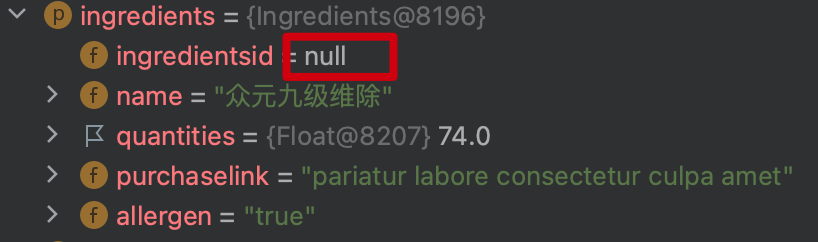
注意此时的ingredientsid这个成员的值是null
而在插入之后,它的值发生了变化:

此时ingredientsid的值已经被MyBatis设置为主键id
我们在回到数据库中查看一下这条记录的id是否为10:
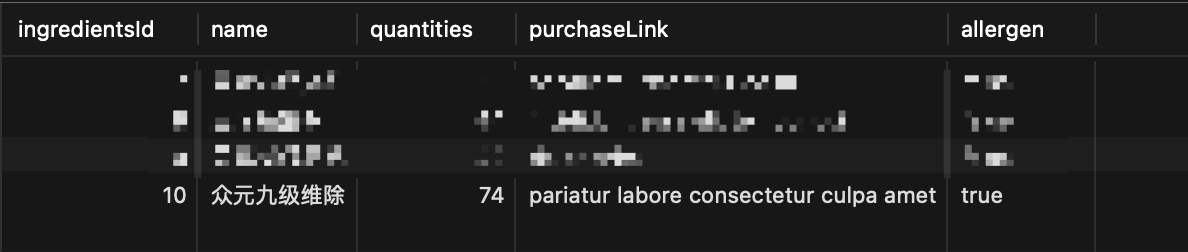 所以正确的获取自增id姿势应该如上文所示。